
Description
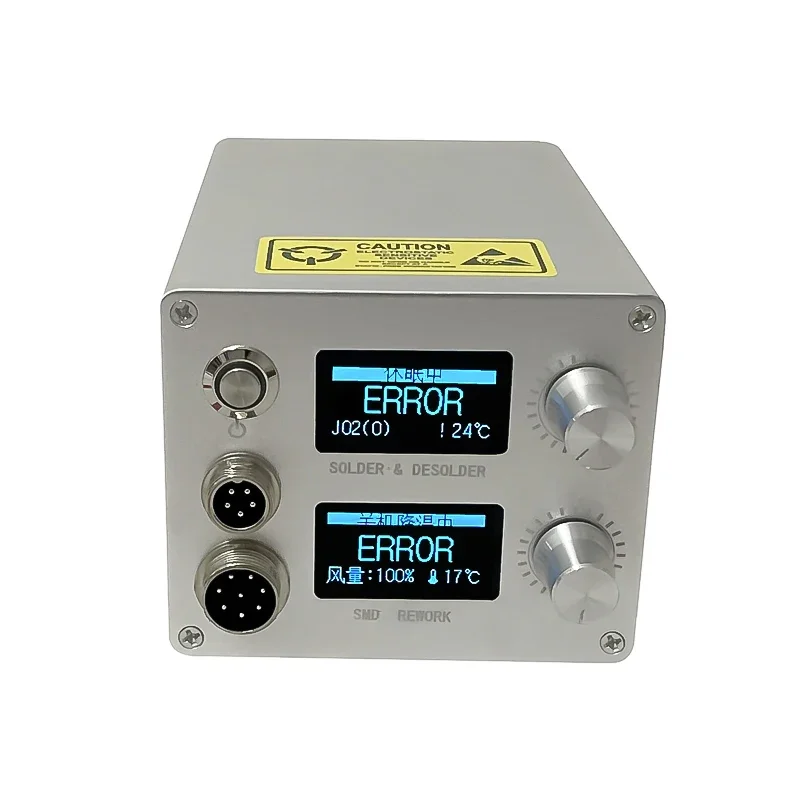
The 858DS Solder Station Kit served as a versatile tool for several complex soldering tasks. It included a hot air gun and an electric soldering iron, each having their distinctive roles in the process. These components boasted remarkable heat stability and durability. LED displays were provided, giving users a precise measure of core temperature, thus ensuring a seamless soldering experience. The kit offered great assistance in both construction and repair, enabling a broad spectrum of activities including soldering, desoldering, and rework operations.
The soldering iron was designed to provide a clean and efficient soldering job, maintaining a consistent temperature during operation to avoid subpar solder joints. The Hot Air Gun, on the other hand, was ideal for heat shrink, drying, paint removal, thawing, warming, plastic welding, and more. The precision of the tools combined with the resilient nature of the design, made the 858DS Solder Station Kit a consistent performer. Ultimately, this kit was essential for anyone looking to do both basic and complex soldering related tasks, with its well-rounded tools offering a strong promise of quality and efficiency.
Main functions and performance characteristics of the soldering station:
1. The temperature control range of grid iron is 150~-480C. Phoenix gun temperature control range 150~-550C
2. The automatic supply range of the thermocouple cold Rui temperature is -9-99C (need to be calibrated).
3. PID temperature control. Temperature stability ± 2C (without load).
4. 5 groups of temperatures can be saved.
5. The temperature parameters of the year can be saved separately, it supports all T12 class heads, and has 6 custom heads, which can shield the less commonly used heads (in the light single
Enable your usual leader in Solder Management).
6. Automatic standby (time 1-60 minutes can be set).
7. Automatic eye rest (soft shutdown) (time 1-60 minutes can be set).
Main operation:
1. Under normal circumstances, the charcoal will turn 3 bars counterclockwise continuously within 1 second, and enter the standby (default 200 degrees (150-300 degrees can be electrically set) state, if the temperature is set
If the temperature is lower than 200 degrees, it will go to sleep directly.
1.1 In standby state, within 1 second, the hour hand rotates continuously for 3 grids to sleep (soft shutdown), and in interrupted state (soft shutdown), short press the encoder to enter
Working status
1.2 In the standby state, press the spreader or turn it clockwise to restore the working state.
2. Under normal circumstances, turn 3 bars clockwise continuously within 1 second, enter the power enhancement, the current temperature is +50 degrees (10-200 degrees can be configured), after 5 minutes
After the clock (1-60 minutes can be set), it will automatically reply, and it can also be restored by any operation of the reducer in advance.
3. Under normal circumstances, short press to enter the temperature setting state.
3.1 In the temperature setting state, the humidity of the current setting group can be adjusted by rotating the fiber encoder. The default step is 5 degrees (steps 1-50 can be set).
3.2 In the state of temperature setting, press and hold the rotary encoder and rotate to switch the setting group.
3.3 In the state of temperature setting, the moment-tech encoder saves and exits to the normal state,
4. Under normal circumstances, press the encoder and turn it clockwise to enter the head change interface. Under this interface, the output is turned off, and the head change can be performed with power on. Can
Switches the head subtype and recalls the correction curve of the associated head.
5. Under normal circumstances, press the encoder and rotate it counterclockwise to enter the temperature calibration surface, to calibrate the parameters of the current soldering iron tip, and to restore the martingale recognition.
Correction parameters. Before entering the correction wizard, you need to restore the default correction parameters.
6. Under normal circumstances, long press the encoder for 2 seconds to open the setting menu.
7. For all hall coupons and menus, press and hold the code reduction for 2 seconds to exit without saving.
Air Gun Settings:
Temperature adjustment: directly rotate the tensioner.
Air conditioning: short press the encoder to release, and turn the air conditioning. (The step value of temperature adjustment training air can be set)
5 groups of quick settings:
Press and hold the encoder to turn right, enter 5 groups of quick settings, parameter setting method: set the parameters outside, enter the quick settings, choose to save, and select the save group.
Notice:
1. The temperature of the new soldering iron tip must be set below 250 degrees for tin protection, this is very important
2. When installing the soldering iron head, first remove the steel ring, then insert the soldering iron head, and finally install the steel ring and rotate.


Reviews
There are no reviews yet.